
Unlike the regular questions that belong to a specific client and survey, a normative question is a question that can be used across all of your clients and surveys.
To add a normative question, get started on the main Admin page.

There is no need to select client or a survey, simply use the QuickJump bar and look up Normative Question.
The process is quite the same as when you add regular questions to the survey.
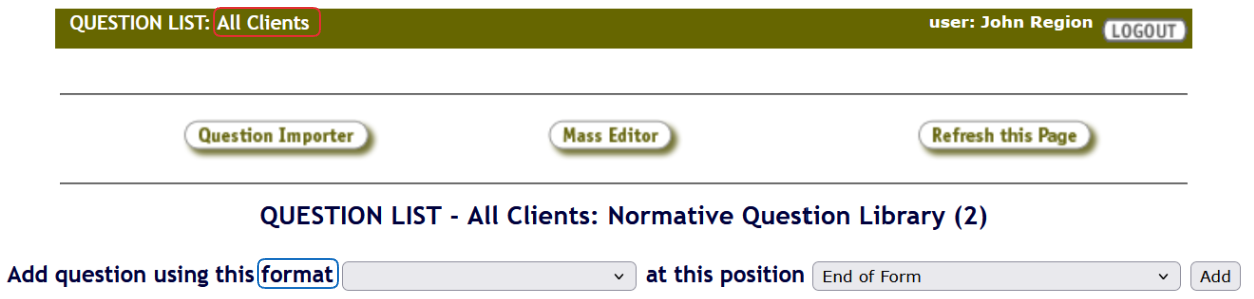
Keeping in mind this question will be usable on all clients, all normative questions must be question types that are numerically quantifiable. This means that the possible question formats are: Yes - No, Yes - No - N/A, Checkbox, Multi-Checkbox, Radio Button, Pull Down Menu, Scored Number, Number, Currency, Measurement, and Time Length.
You can set the requirements of the normative questions, their question and bonus question score, as well as set their N/A scoring. Like the regular questions, normative ones can have their format and visibility changed, and they can be date versioned.

Please remember to refresh your memory about updating questions before making any changes!
Deleting a normative question from the library will not remove the question, or the collected responses, from the surveys it has been added to. Before making this type of change, please open a Support Tracker and let us know what you need.
Once you have added a normative question to your normative question library (or in other words, normative question list), you can add it to a specific survey.
For this step of the process, you will need to select a client and a survey you want to update, and follow the steps for adding questions to a survey.
Simply select the Normative Question (placeholder) type in the format dropdown.

Once you use the Add button, a new window will open, allowing you to choose additional settings.
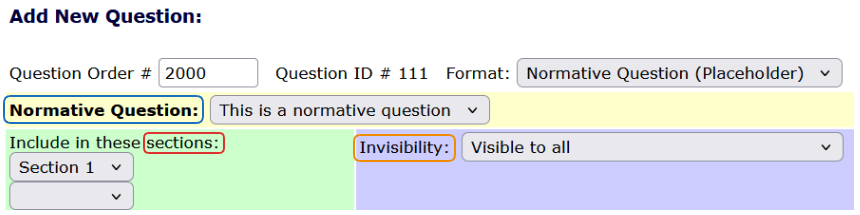
The Normative Question dropdown will list all the questions from your normative question library. Then, the selected question can be included in different sections, or it can have its visibility changed.
 To access the data collected by the normative questions, please open a Support Tracker and we can generate a report for you!